> ## Documentation Index
> Fetch the complete documentation index at: https://docs.blockdb.chaintable.com/llms.txt
> Use this file to discover all available pages before exploring further.
# Data model
> BlockDB's regular tables, Block State Table, Block Event Table, and Time Table, plus the shadow table mechanism.
# Data model
BlockDB offers three logical table types: **regular tables**, and the business abstraction layer's **Block State Table**, **Block Event Table**, and **Time Table**. Each targets a different data shape and serves different business scenarios.
## The three logical table types
| Logical table | Data shape | Typical scenarios |
| - | - | - |
| Regular table (Table) | Row-level | Non-on-chain business data, processed high-value data |
| Block State Table | On-chain state, changes with height | Token balances, contract state, NFT owners |
| Block Event Table | On-chain events, append-only | Token transfers (token\_transfer), contract events |
| Time Table | Physical time series | Token USD prices, TVL snapshots |
## Regular tables (Table)
A regular table maps 1:1 to a physical online table. Use it for non-on-chain business data, or for high-value data derived from on-chain processing. It provides row-level, semantic read, write, and scan APIs.
```python theme={null}
from blockdb import Table
# Regular online table: table creation happens in the platform UI; the SDK does not expose Meta
rules = Table("demo.rules")
# Write: upsert_rows performs a real-time write
rules.upsert_rows([
{"id": "rule_1", "name": "min_value", "threshold": 100},
{"id": "rule_2", "name": "max_value", "threshold": 999},
])
# Read: by primary key / batch / full scan
print(rules.get_row("rule_1"))
print(rules.batch_get_rows(["rule_1", "rule_2"]))
rows = rules.scan("SELECT * FROM demo.rules")
```
## Block State Table
**Purpose**: maintain the latest state of on-chain entities, plus their state at any historical height. Whenever data for a new height arrives, BlockDB stores a historical snapshot at that height and asynchronously updates the latest-state table.
**Example scenarios**:
* Token balances for user addresses.
* Current state variables of a smart contract.
* Current owner of an NFT.
For example, you can query "the USDC balance of address `0xabc...` at block height `18000000`" — a Block State Table can return the state at any historical height, anchored on a block.
## Block Event Table
**Purpose**: maintain every event that happened on chain, for example `token_transfer` transfer events. Once an event happens at a given height it is unique and immutable — append-only, never updated.
**Example scenarios**:
* Token transfer logs (token\_transfer).
* Events emitted by contracts.
* Individual matched trades on an exchange.
For example, subscribe to a token's `transfer` events to compute `from` / `to` / `value` for every transfer in real time.
## Time Table
**Purpose**: maintain a state series that changes with real-world (wall-clock) time, for example a token's USD price table.
**Example scenarios**:
* A token's USD price every minute.
* TVL snapshots per minute.
* Any metric that changes with physical time.
For example, you can store USDC's USD price every minute and query the historical price at any timestamp.
***
For the models and on-chain semantics of Block State and Block Event tables, see [Block State Table and Block Event Table](/concepts/block-tables); for Time Table, see [Time Table](/concepts/time-table).
## The shadow table mechanism
A business abstraction table does not map directly to a single physical table. When you create one, BlockDB automatically creates several cooperating regular tables (shadow tables) in the storage layer, each maintaining a different dimension of the data:
| Business abstraction table | Derived shadow tables | Responsibility |
| - | - | - |
| **Block State Table** | main table
`_archive`
`_height`
`_bundle` | Latest values
Historical snapshots per height
Processing progress / consensus height
Data range hashes |
| **Block Event Table** | main table
`_height`
`_bundle` | Raw events (append-only, no `_archive`)
Processing progress / consensus height
Data range hashes |
| **Time Table** | main table
`_archive` | Latest bucket
History (composite key `(id, time_at)`) |
Sub-table names use an **underscore** prefix: `._archive` / `_height` / `_bundle`.
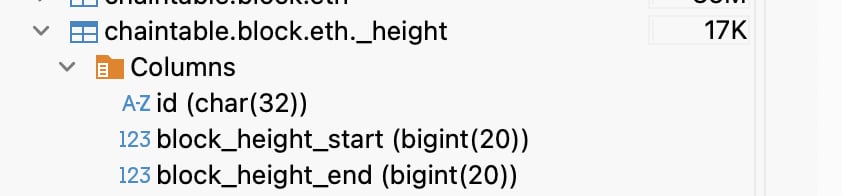
* **`_height` table**: records closed `height_start` / `height_end` intervals, marking which height ranges have been processed contiguously; also used to determine the consensus height. Useful for troubleshooting gaps; you rarely touch it in code.
* **`_archive` table**: stores historical snapshots. Same structure as the source table, except the `id` column becomes `original_id` and a new `id` column is added.
* **`_bundle` table**: maintains a data hash per 1000 blocks, mainly for offline systems such as S3 sync.
Shadow tables can be read directly through the regular-table read APIs (`GetRow` / `BatchGetRows` / `FilterRows`), which is handy for troubleshooting or expert-mode reads. However, **writing to shadow tables through the regular-table write APIs is forbidden** — all writes must go through the business abstraction table's own block or time semantic write interfaces.
### Block State shadow tables
 ### Block Event shadow tables
 ### The \_height progress table
 This documentation is built and hosted on [Mintlify](https://mintlify.com), a developer documentation platform.